PROJECT OVERVIEW
Bank Reconciliation
Bank Reconciliation is a platform in FreshBooks where business owners can effortlessly import and manage their bank transactions so they’re able to keep their books organized.
I’ve designed a new feature: Import Transactions From File.
-
FreshBooks is a leading accounting platform for small and medium-sized businesses. It’s a SaaS platform available on both desktop and mobile. 30M+ businesses in 160+ countries have used FreshBooks so far. The company was founded in 2003, and is based in Toronto, Canada.
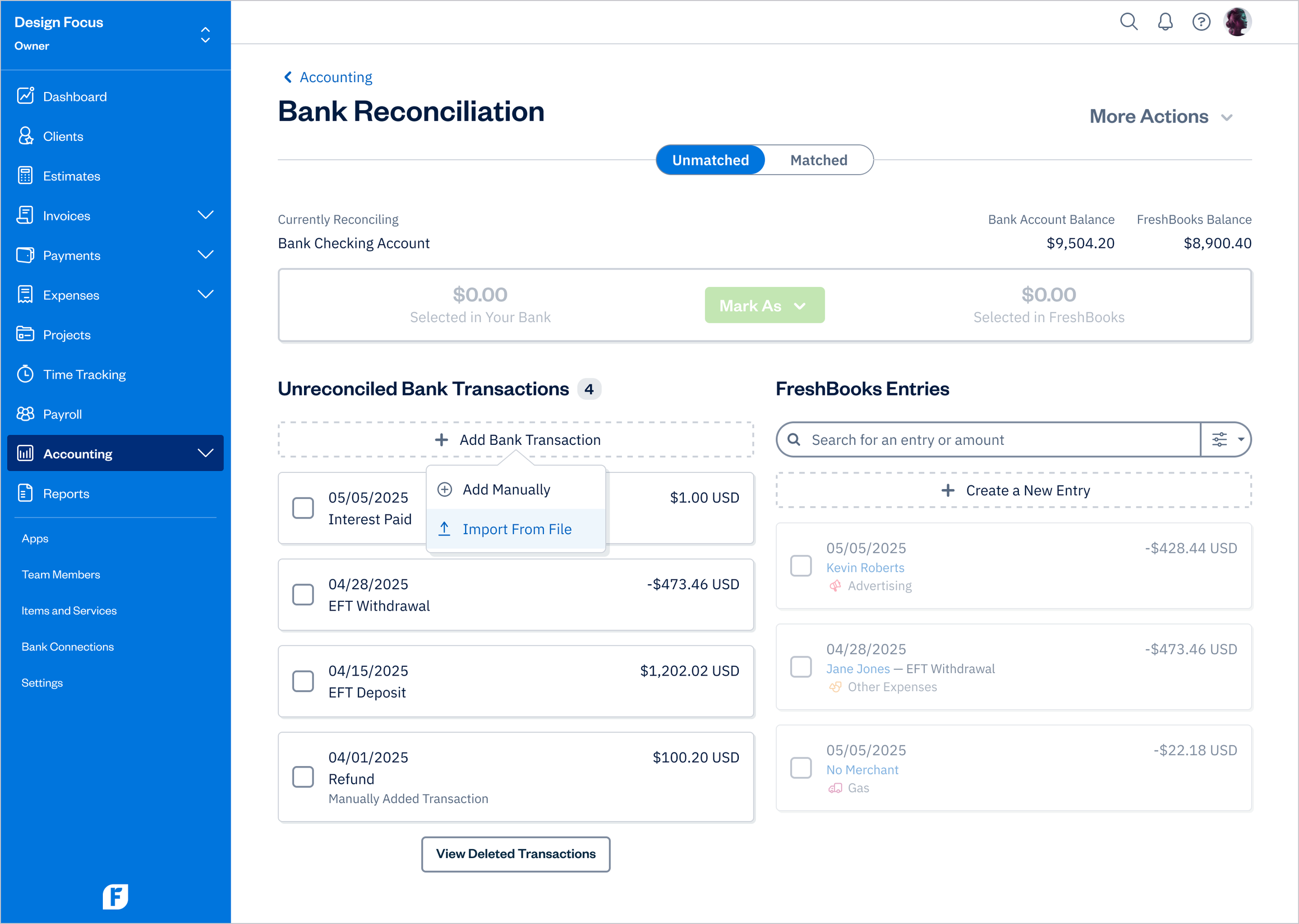
Bank Reconciliation - Import From File
FEATURE EXPLAINED
Bank Reconciliation Explained
Bank Reconciliation allows business owners and accountants to match bank transactions with FreshBooks entries to ensure the balance sheet reflects the actual bank account balance.
This is optional but highly recommended for users. It can be done at any time or as part of a daily, weekly, or monthly routine.
-
By comparing the transactions that the business owner has entered into FreshBooks to the source of truth (money that has actually left their bank account), they can ensure their accounting books in FreshBooks are as accurate as possible
Makes the business owner’s workflow a lot easier, so they don’t have to create journal entries in order to have an accurate balance sheet (e.g., to allocate certain cash transaction to a separate bank account and to get them out of petty cash)
If a business gets audited, one of the first things that auditors will do is to compare owner’s bank statements against their general ledger (what they entered in their accouting software) to see if something is missing or added in to make sure their books are accurate and not fraudulent. Reconciled transaction make the audit process a lot smoother because the owner has already matched everything up in their bank account
-
Connect a bank account
Set an Opening Balance
Start matching
PROBLEM DEFINITION
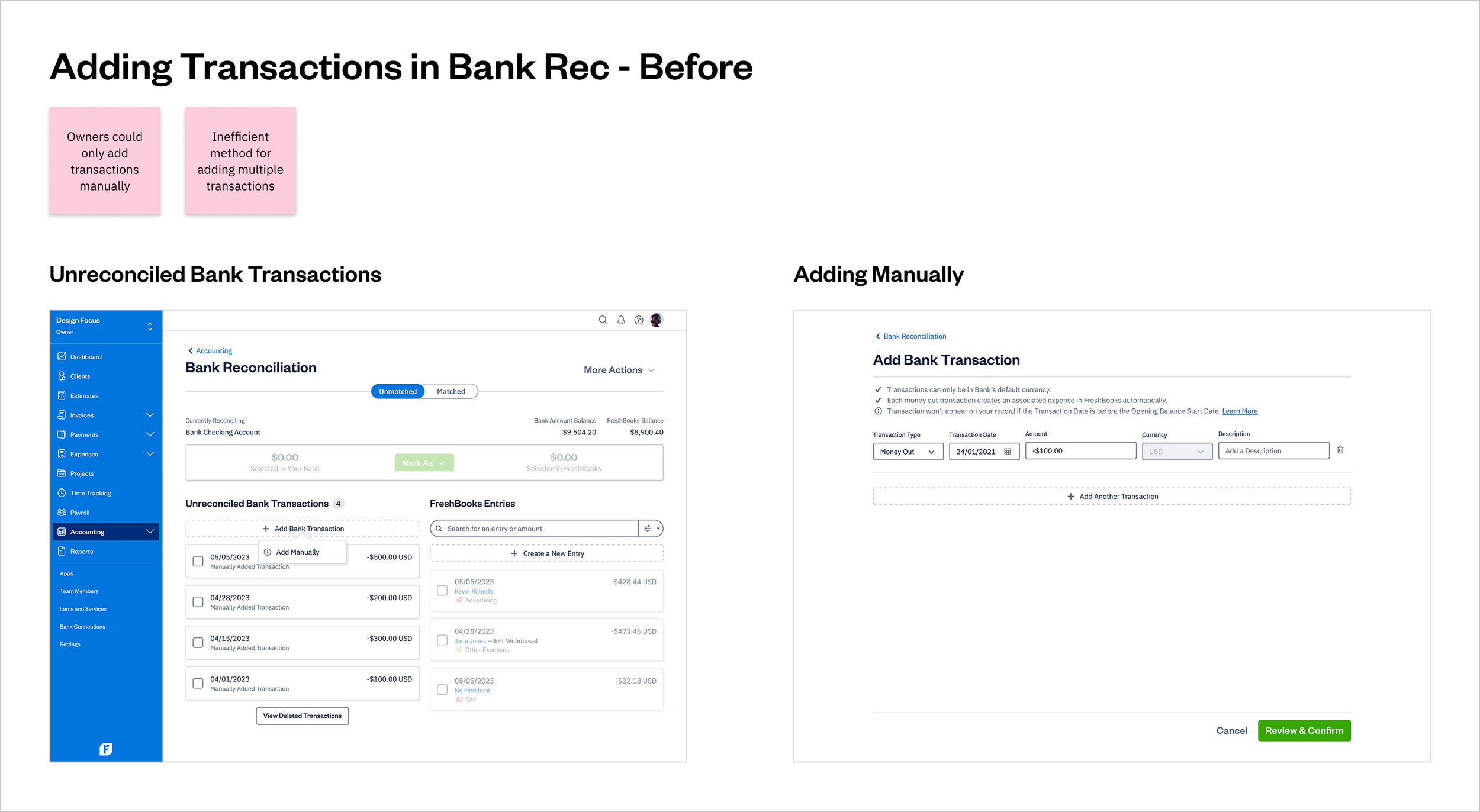
No Ability to Add Multiple Transactions at Once
Previously in FreshBooks, business owners and accountants had to enter transactions manually (one at a time), which was a slow and inefficient method for handling multiple entries. This limitation caused friction, discouraging users from reconciling transactions regularly.
UX STRATEGY
UX Strategy
Vision
A platform where business owners can effortlessly import and manage their bank transactions so they’re able to keep their books organized.
Goal
Help business owners quickly and confidently import and manage bank transactions, increasing adoption, engagement, retention, and task success.
Plan
Make the process of importing transactions quick, efficient, and intuitive, reducing friction and ensuring accuracy.
DESIGN PROCESS
Design Process
Due to a tight timeline for this project, the team and I had to scale down our research process, leaving out some aspects such as user interviews and usability testing.
However, we leveraged product analytics, insights from customer feedback, and survey results. This enabled us to develop a hypothesis that guided us toward a solution that addressed issues users were experiencing with Bank Rec.
User Research
Analytics review
UX audit
Journey map
Competitive analysis
Design
User flows
Wireframes
High-fidelity design/prototype
Final design
Design handoff
USER RESEARCH
UX Audit
Conducting a UX audit helped me identify gaps in the customer experience related to adding bank transactions.
Journey Map
When creating a journey map, the goal was to illustrate specific pain points that users face when trying to add multiple transactions on the Bank Rec page. I identified opportunities and quick wins to streamline their workflow.
Competitive Analysis
Bulk import and transaction management are common features among competitors, though many solutions fall short in terms of user-friendliness, which can lead to business owners feeling unsure about using these tools effectively.
DESIGN
User Flow
The final user flow shows a straightforward and quick process of adding multiple transactions.
Wireframes
I created wireframes based on the final user flow, using well-established UI components from the design system while incorporating the new feature.
SOLUTION
Easily Import All Transactions
A platform where business owners can effortlessly match transactions from their bank account with records in their FreshBooks account, no matter what bank or credit card they’re using so they’re able to keep their books organized.
By having the ability to import a CSV file into FreshBooks, business owners can now easily manage their Bank Reconciliation transactions to keep their books well organized.
Note: Bank Reconciliation is only available on Plus, Premium, and Select plans while Trial users can access the feature for 30 days.
-
Get the account statement (CSV file) from the bank
Adjust the CSV file for importing if necessary
In FreshBooks, go to: Accounting, click on the "x left to match" link next to the Bank Account to reconcile
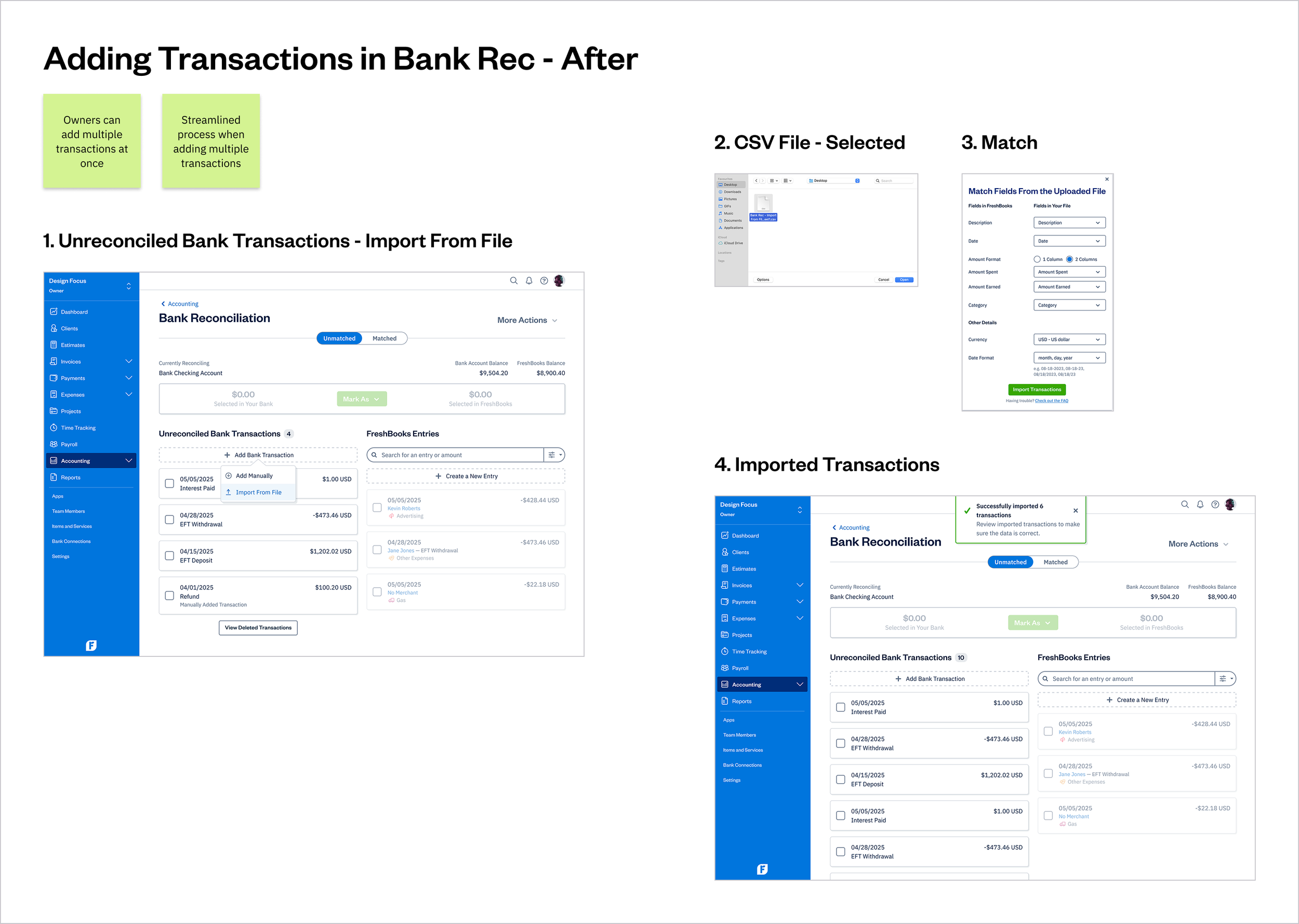
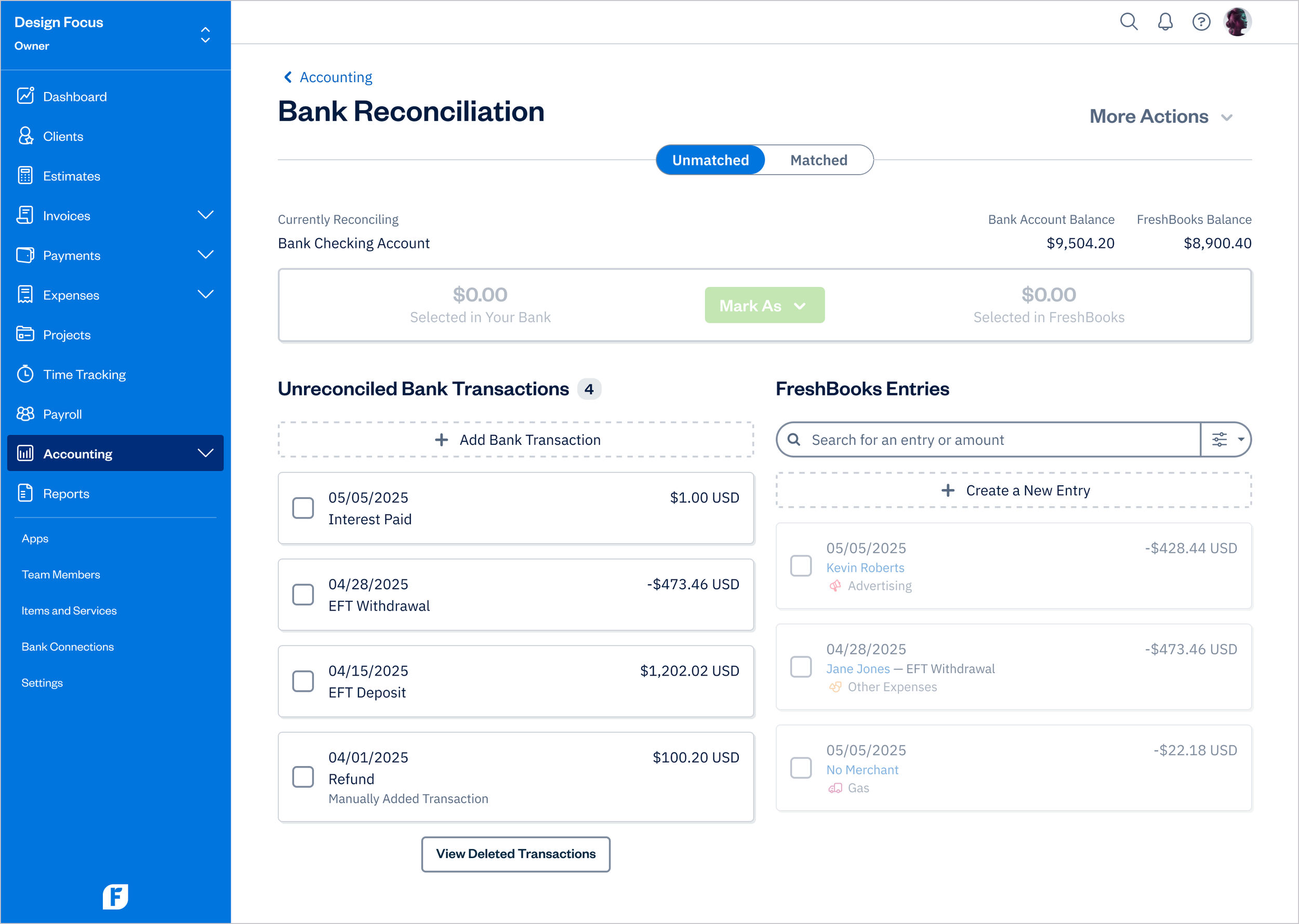
In Bank Rec, under Unreconciled Bank Transactions, click on the Add Bank Transaction button and then Import From File
Select a CSV file from the computer
Match the fields to the columns from the file using the dropdown (e.g., Date should match to the Date header inside the file)
Once matching is done and the Date Format is specified, click on Import Transactions
New transactions will be added and reconciling can begin. If the new transactions are from before the Opening Balance Start Date, the Start Date will need to be adjusted to include these new transactions before they can become available for matching
DESIGN
Final Design
To preserve the user's workflow, I designed the import experience as a modal, so users could complete the task without leaving the current page. After importing a CSV file, users stay in the modal and match each column on the right to its corresponding field on the left using input fields.
You can view the prototype to explore the design in more depth.
Note: the prototype has limited functionality.
Design Principles
Adapt to the Task
Maintain Flow
Speak Human
Set Expectations
Don't Add, Evolve
Inclusive by Design
Challenges and Trade-Offs
Helping Users Recover from Errors
The uploaded CSV file may contain the following problems:
The CSV file itself is corrupt
There are no header columns in the file or one header column is missing
The file is larger than 5 MB
To help users recover from these errors, the system surfaces a toast message after upload that explains the issue and suggests next steps. This approach is consistent with FreshBooks’ system-wide messaging patterns and provides clear, immediate feedback.
However, resolving these errors requires users to leave FreshBooks, fix the file in an external tool, and then return to complete the flow. While this goes against the FreshBooks principle of Maintain Flow, it represents a trade-off: these errors come from outside the system and cannot be predicted or prevented within the product.
The images below show the process of importing a CSV file and matching transactions.
Bank Reconciliation - Unmatched
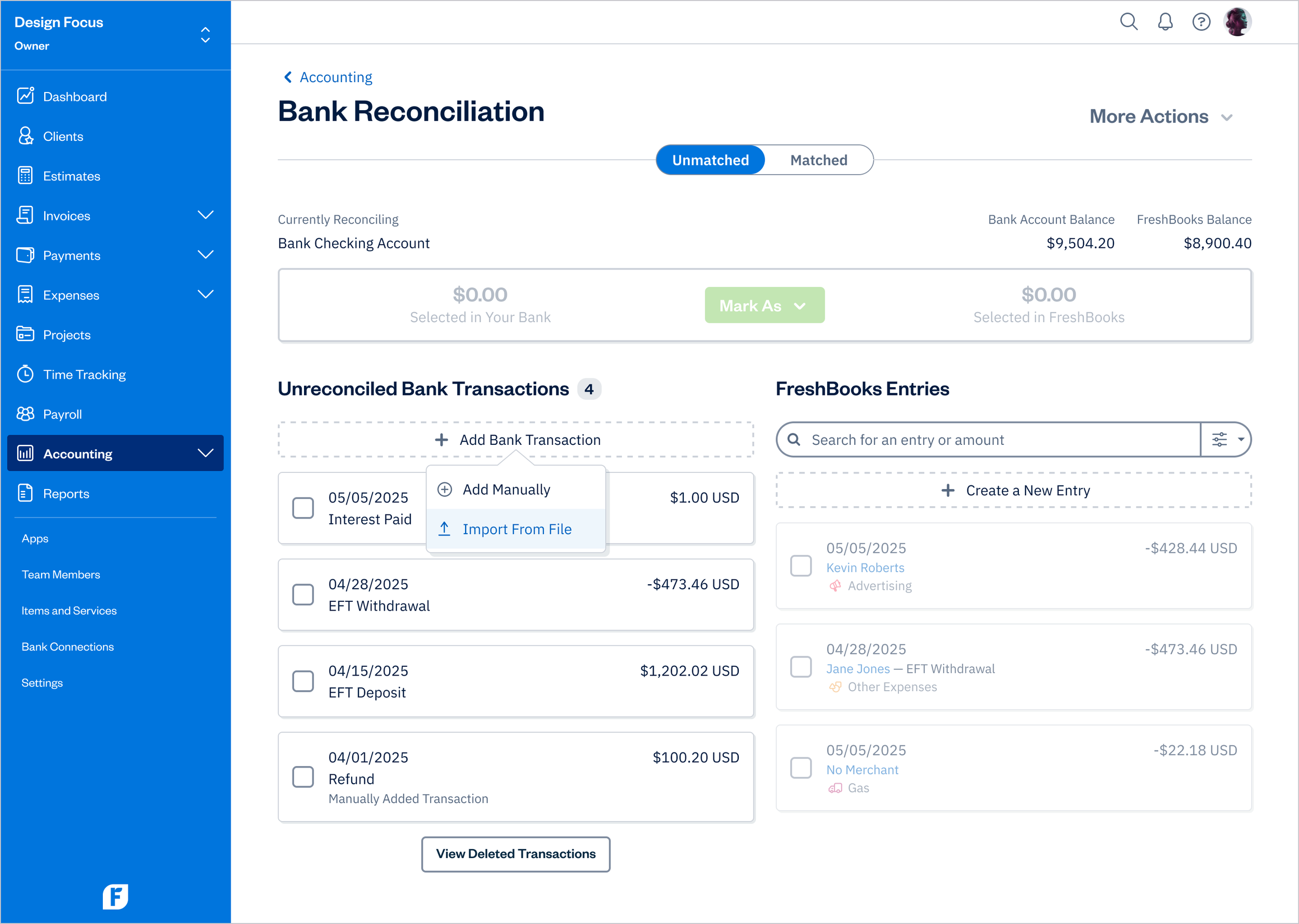
Add Bank Transaction - Import From File
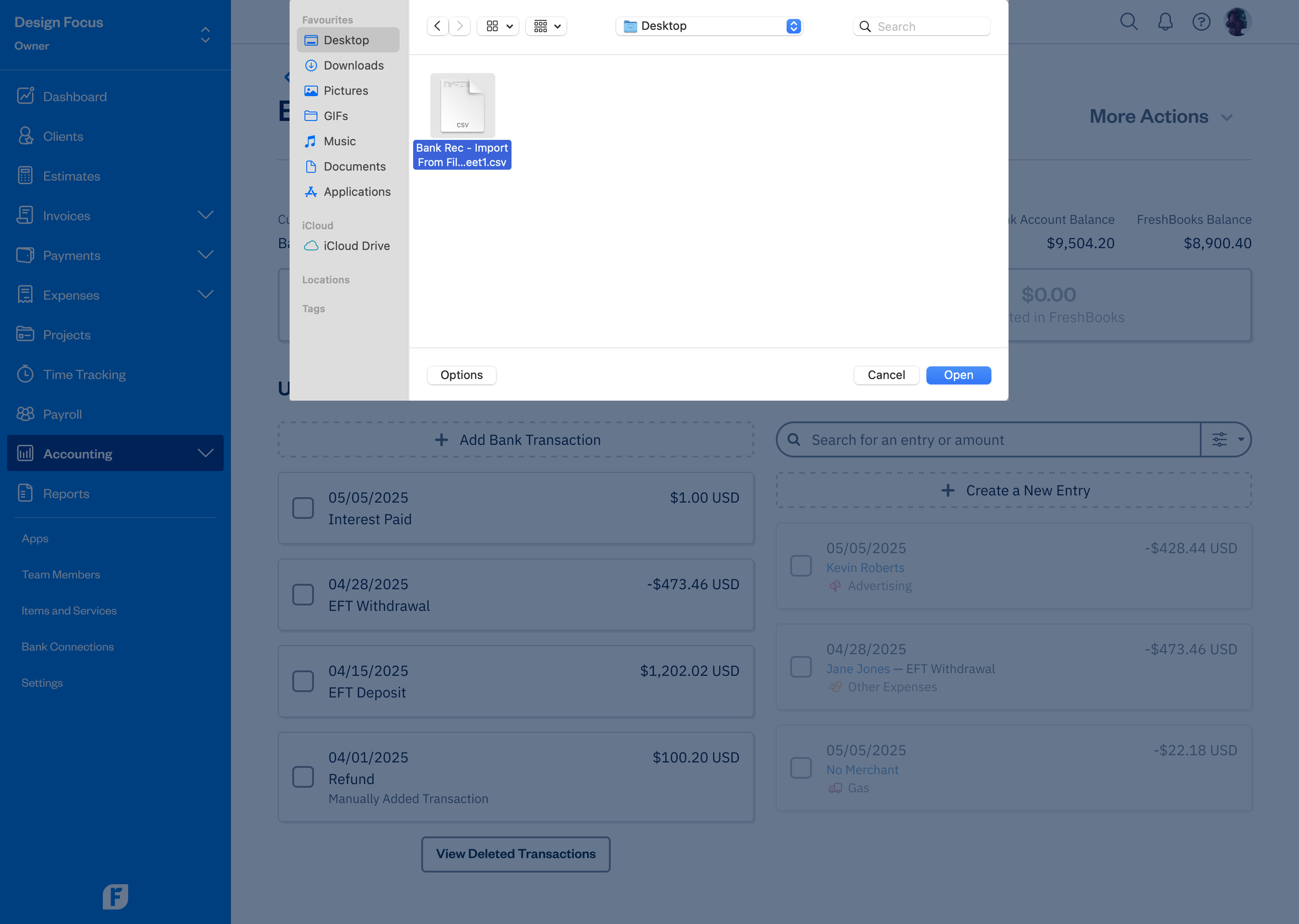
Import From File - CSV File - Selected
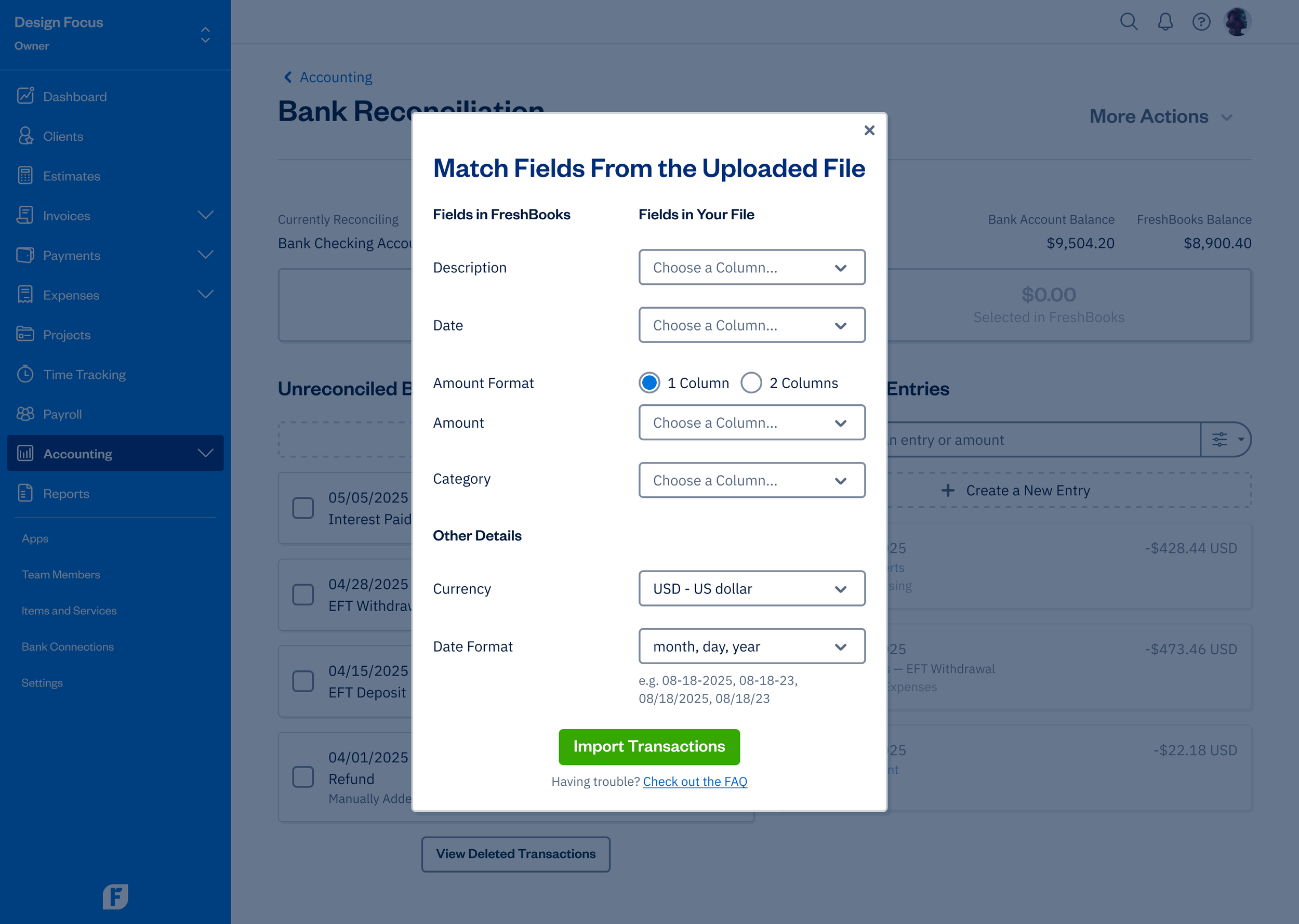
Import From File - Match - 1 Column Amount Format
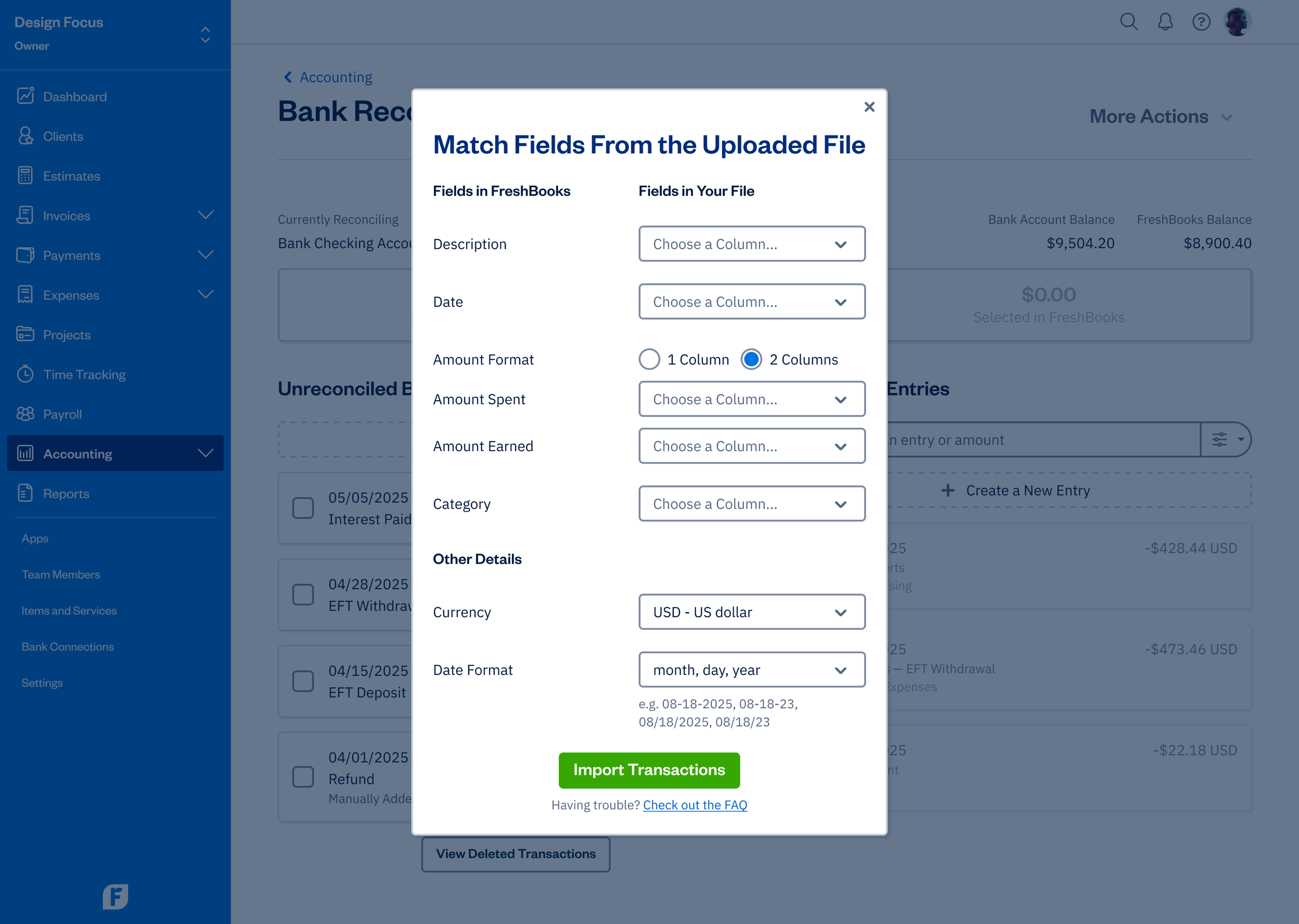
Import From File - Match - 2 Columns Amount Format
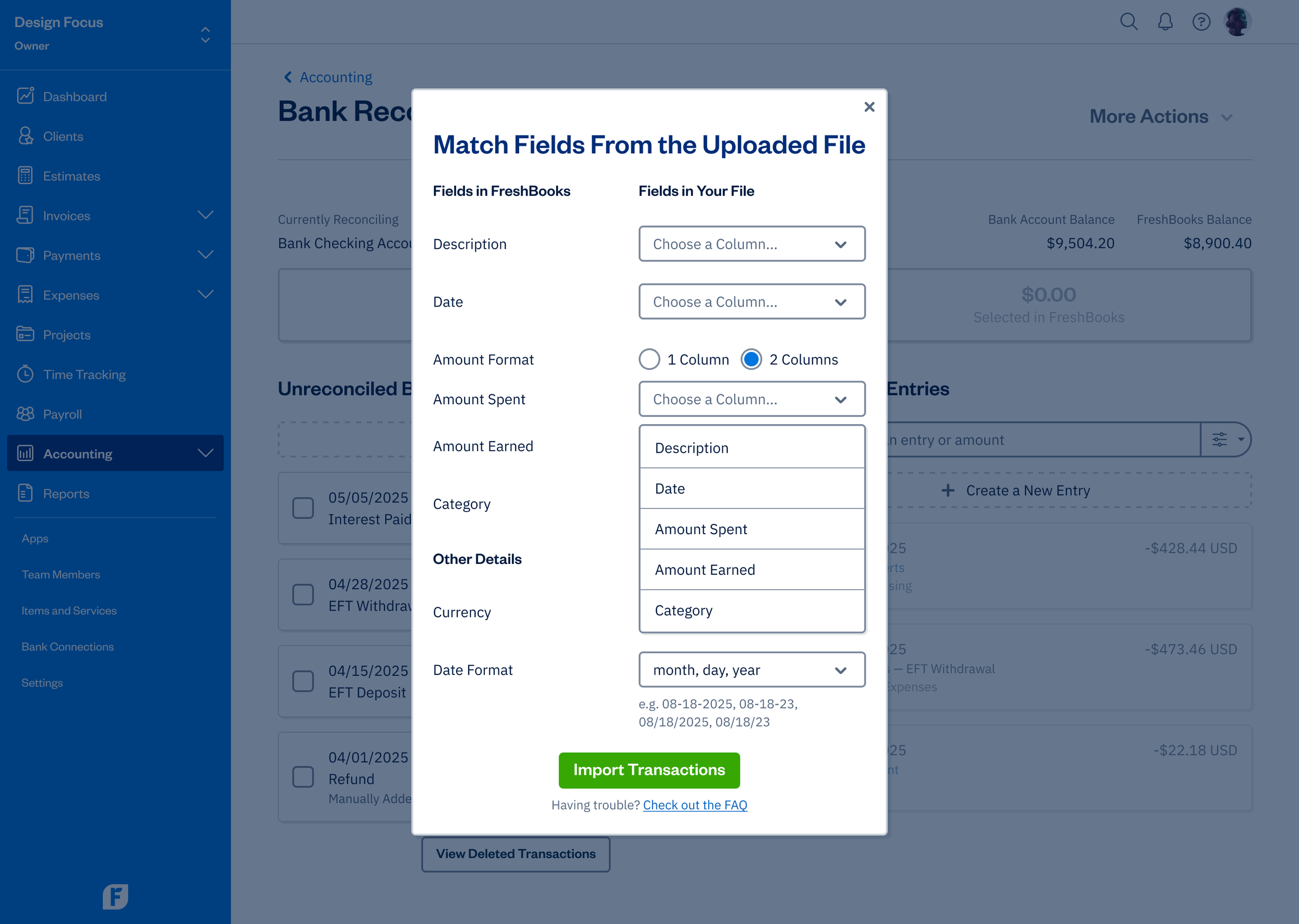
Import From File - Match - Amount Spent
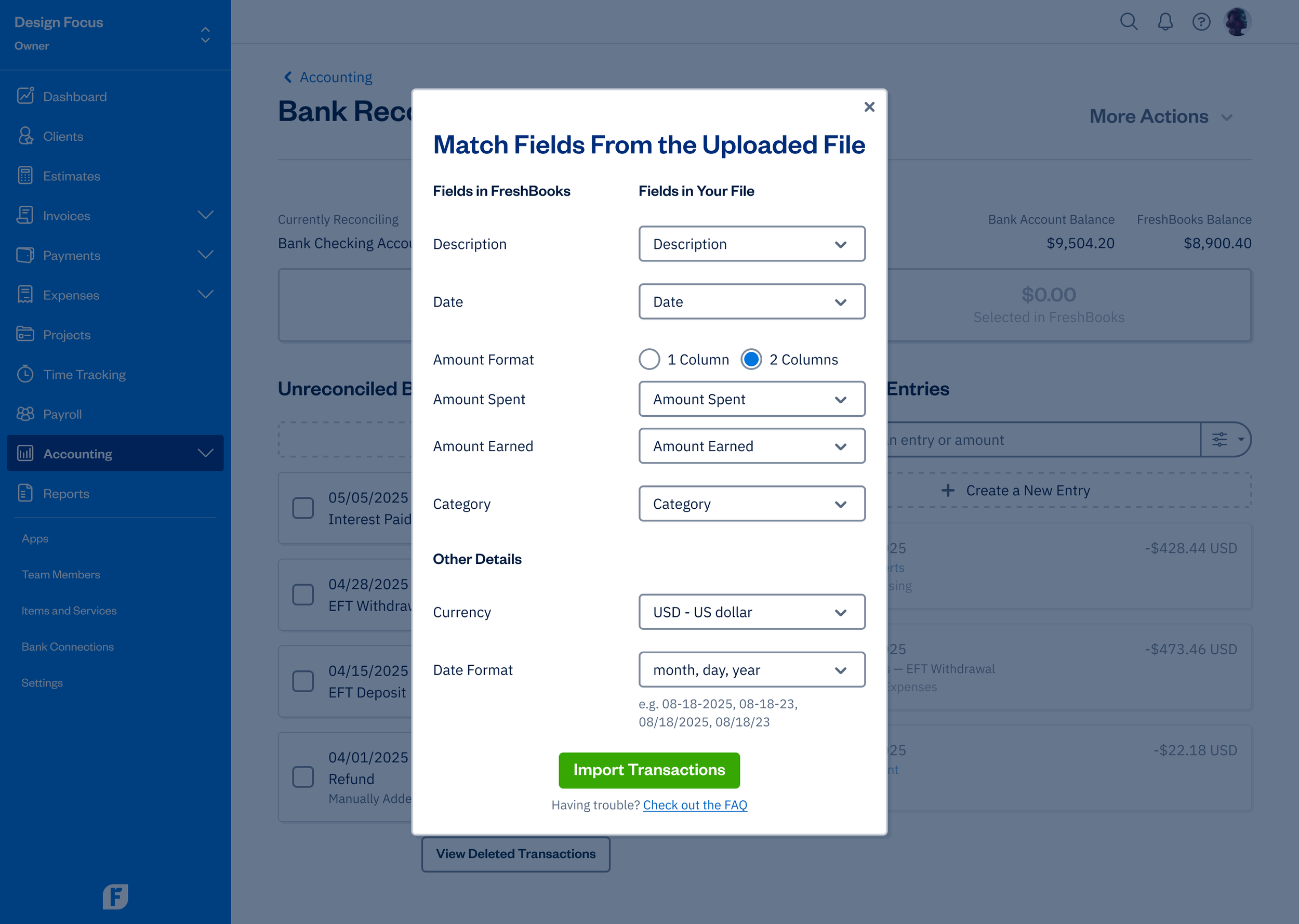
Import From File - Match Modal - Filled
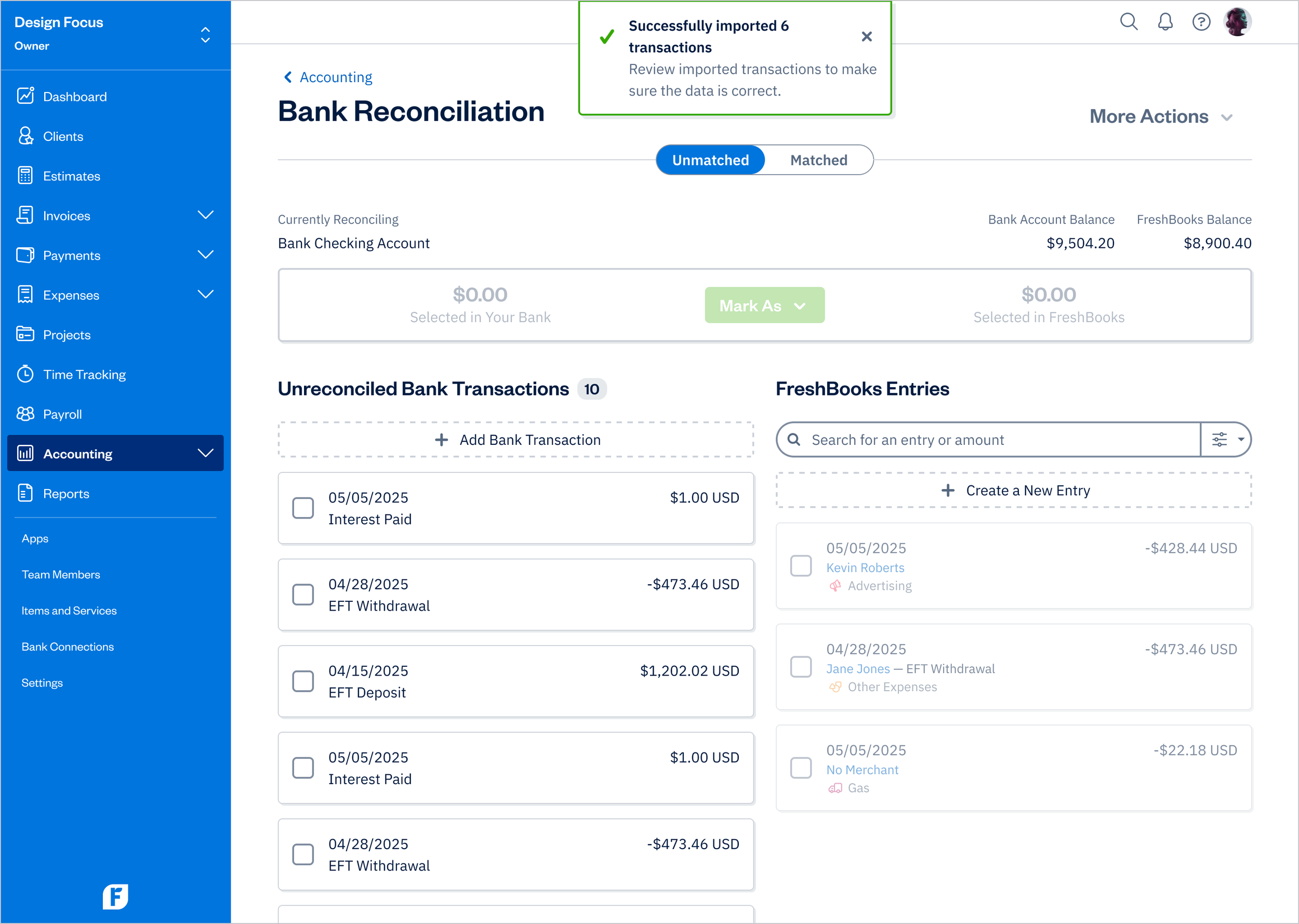
Imported Transactions
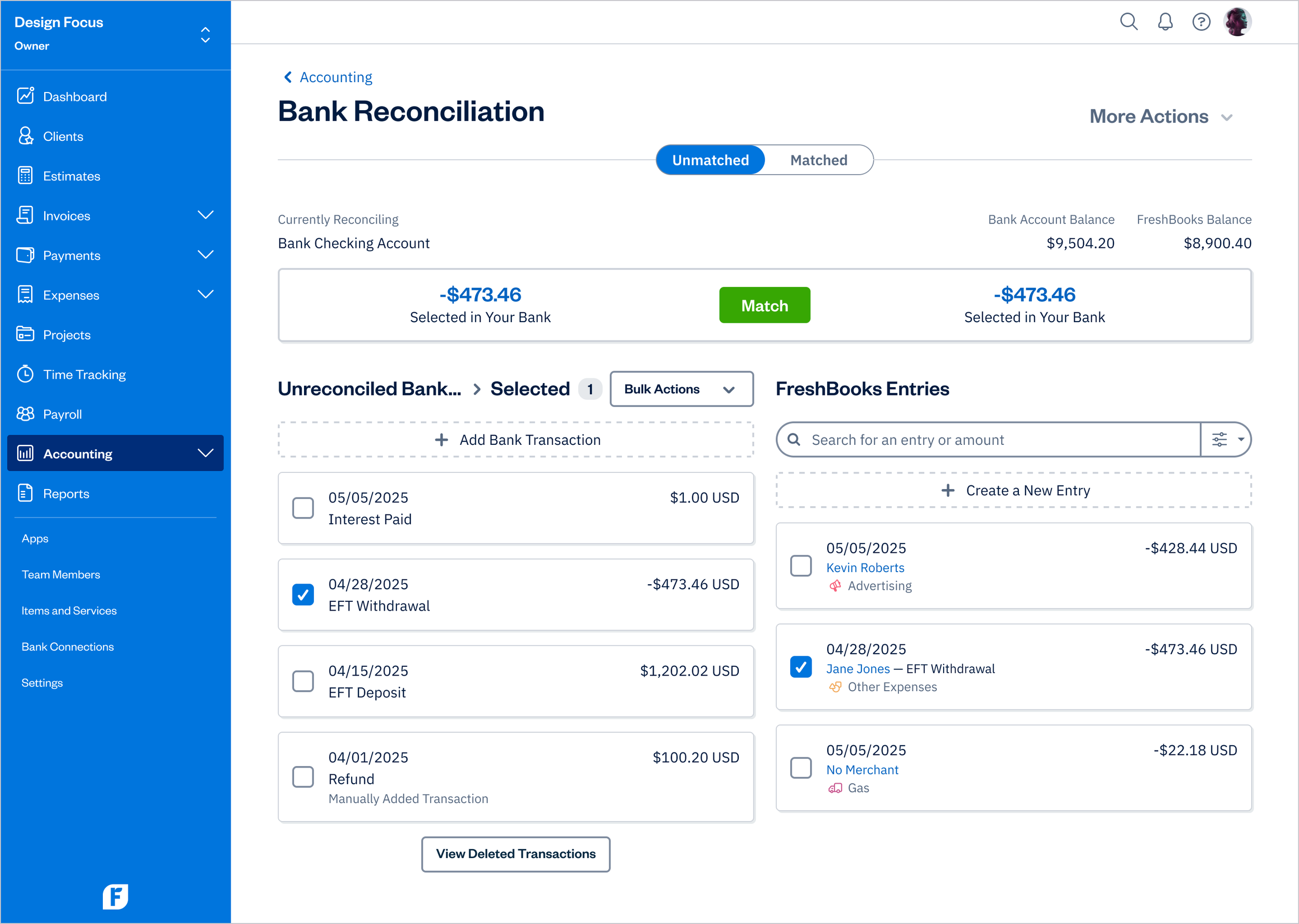
Matching Transactions
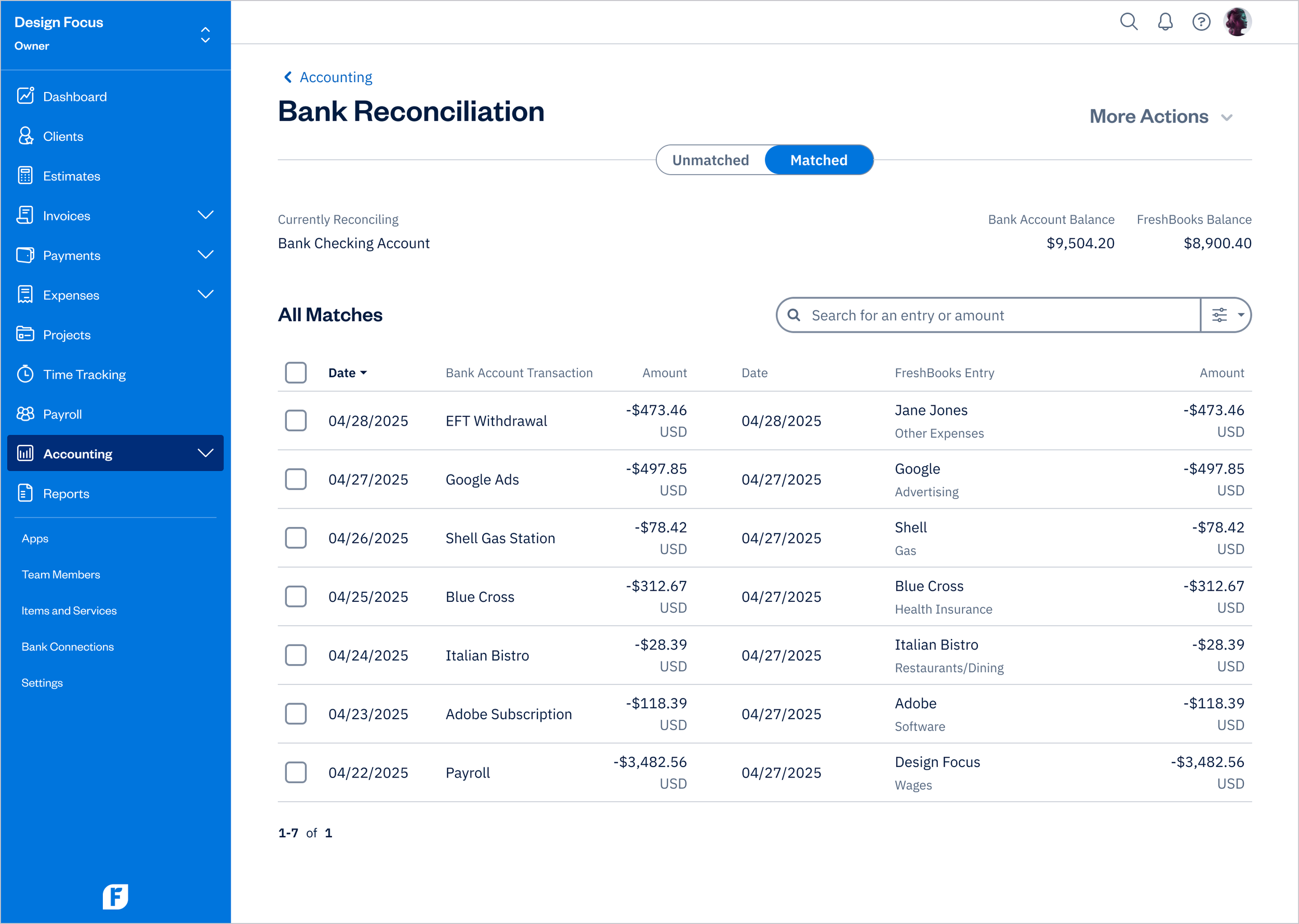
Matched
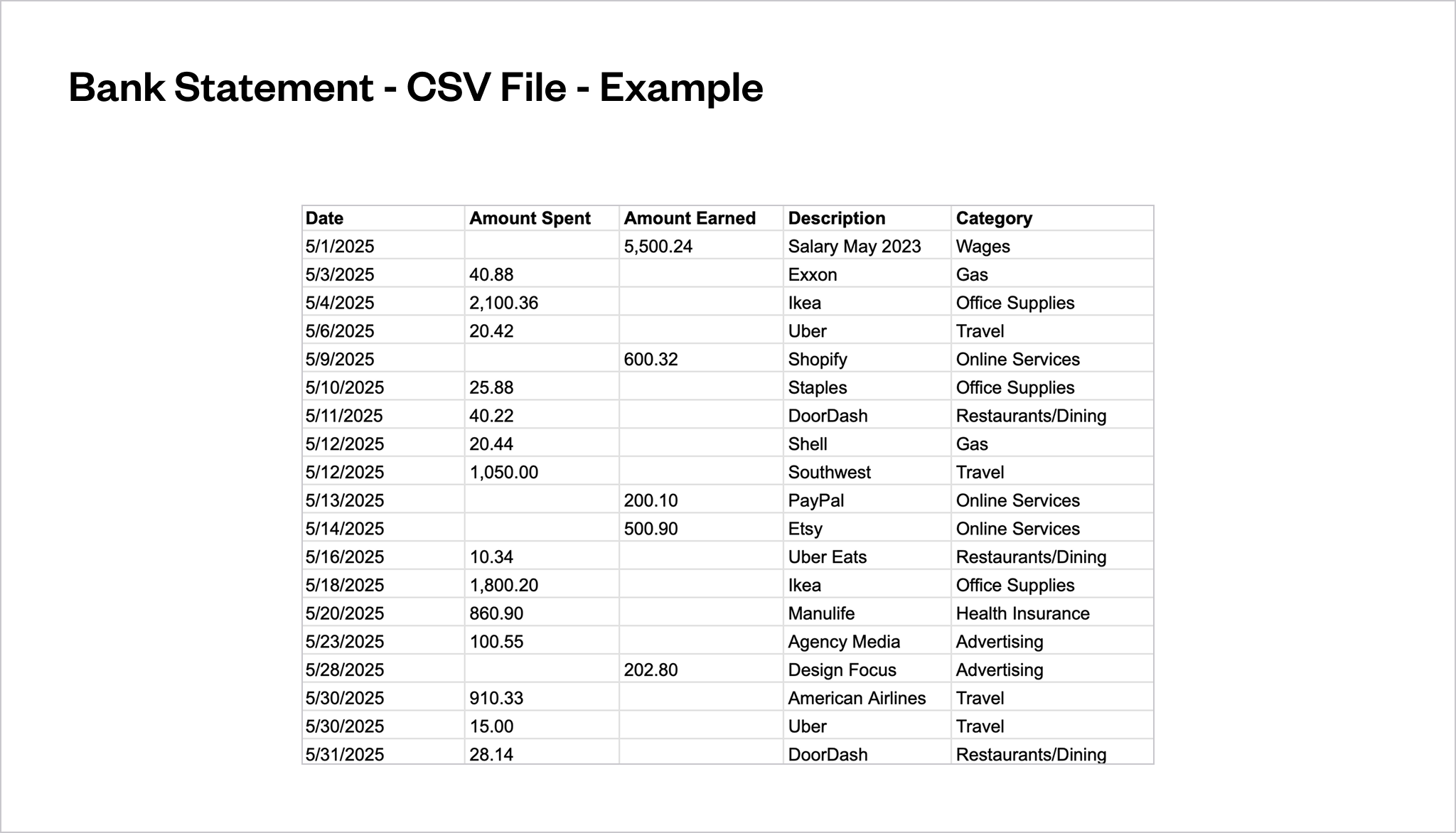
Bank Statement - CSV File - Example
Note: The “Description” and “Category” columns are optional but can be included in the CSV file before importing to improve matching accuracy.
IMPACT
KPIs
The new Import Transactions From File feature made a strong impact following its release, reflected in key success metrics and positive customer feedback.
30,000+
monthly active users
82%
adoption rate
90%
engagement rate
92%
retention rate
+40
net promoter score
85%
task success
How We Measured Success
Adoption rate (82%): Percentage of users who interacted with the “Import Transactions from File” feature after gaining access to Bank Reconciliation (post-launch).
Engagement rate (90%): Percentage of active users performing meaningful actions within the import workflow monthly, such as uploading files and matching transactions.
Retention rate (92%): Percentage of users who continued using the “Import Transactions from File” feature month-over-month, based on active feature usage.
Task success rate (85%): Percentage of users who successfully completed a transaction import each month.
NPS (+40): Based on in-app and email surveys, where most respondents rated the experience 7-10, highlighting the streamlined import process.
Usage metrics were tracked via FullStory, and survey feedback was collected using Pendo.
Customer Feedback
“Importing transactions used to take forever and required multiple steps. With the new feature, I can upload my file and have everything reconciled in minutes. It’s a huge time-saver.”
Business Owner
PROJECT DETAILS
Project Details
Role: Senior Product Designer, UX Researcher
Company: FreshBooks
Industry: Finance
Market: B2B, SaaS
Team: Senior Product Designer (me), Product Manager, Engineering
Frameworks: Agile
Tools:
Design: Figma, Zeroheight, Miro
Project management: Jira, Confluence
Product analytics: Fullstory, Pendo, Looker
Year: 2023
Platform: Web
Link: FreshBooks.com